Your dashboard
The Overview page is your home base in Tomobi. It shows everything that needs your attention right now — new talent submissions, roles that are stalled, and shootings where the cast is not yet complete — so you can act without hunting through individual projects.
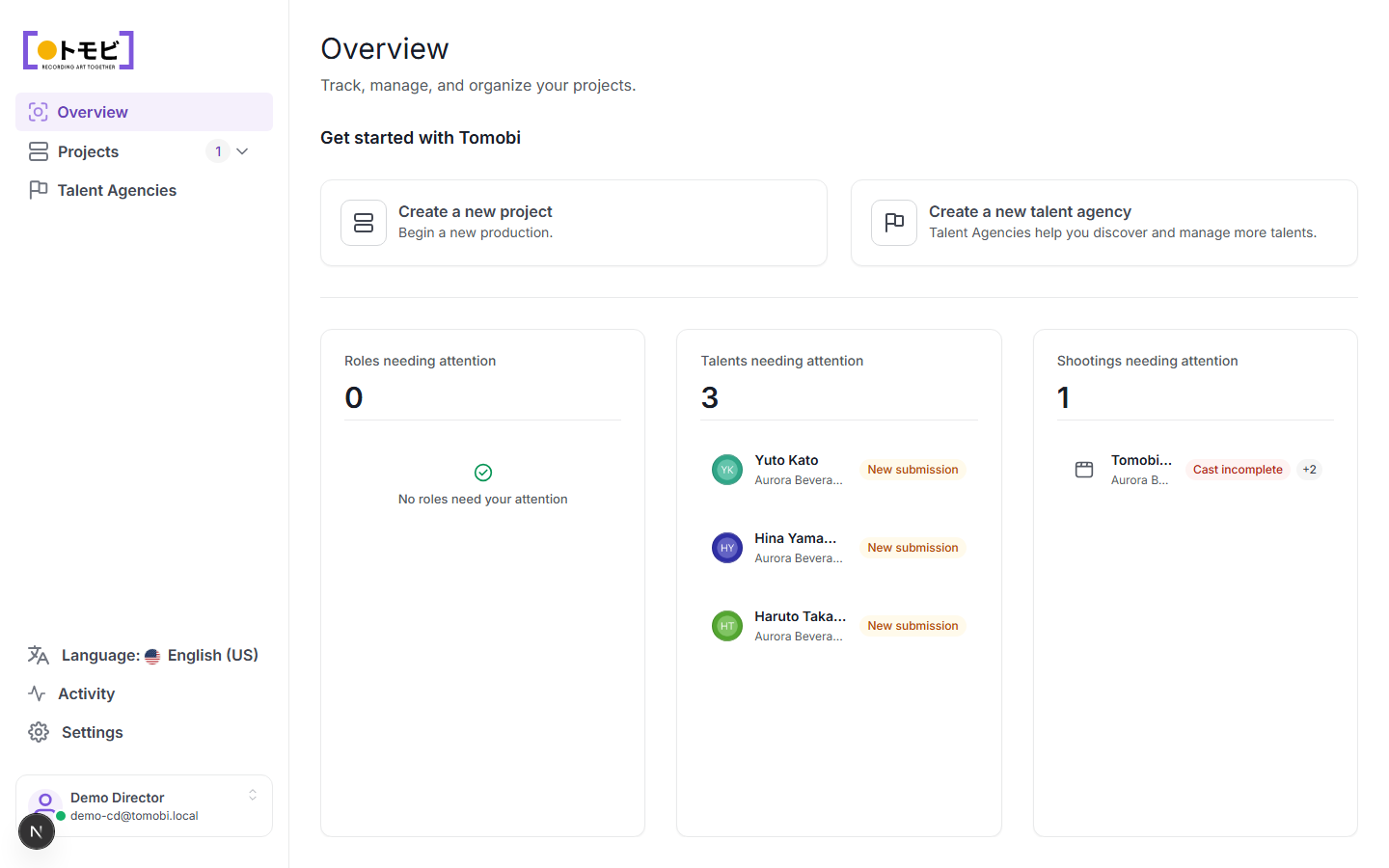
What you see on the dashboard
The dashboard is divided into three panels:
- Roles needing attention — roles where something is blocking progress (for example, a casting call has not been sent or no one has applied).
- Talents needing attention — recent submissions waiting for you to review. Each entry shows the talent's name, the project they applied to, and a status label such as "New submission".
- Shootings needing attention — upcoming shootings that are not fully cast. The label tells you what is missing (for example, "Cast incomplete").
In the example above, three talents from the Aurora Beverage — Spring Campaign project have submitted recently, and one shooting still needs talent confirmed.
Navigate to a project
Select Projects in the left sidebar to see all your active projects. Click any project name to open it. If you have several projects, the sidebar shows the count next to the Projects label so you can see at a glance how many are active.
Quick actions
The "Get started with Tomobi" section at the top of an empty dashboard offers two shortcuts:
- Create a new project — opens the new-project form.
- Create a new talent agency — opens the agency registration form (see Talent agencies).
Once you have active projects these shortcuts move to the background and the attention panels take centre stage.